HV code 3 number 2

I note that Philip Oakley responded to the original HV code 3. For some reason, I cannot see any responses either on iPad or PC. A tab indicates that there is an error and the moderator is aware. Can someone advise if they can view the post with all responses?

Parents
  • I have the same problem.

    It seems to be due to a script. I think that the problem started after mapj1 left a response.

  • yep its all my fault ;-(  my response linked to a DNO doc showing planting depths, bog shoes and so on, and concluded you can take quite a lot of earth away before it is an issue. I'll not link to it again however... 

    Its more fun than that, yes mods are aware, they can't unblock it, and  it has been escalated back to the S/W provider, who it seems are either also stuck or not that bothered as its been over a week now.

    Mike.

  • It still begs the question as to how Philip Oakley was able to respond, but I have just done so and cannot see my response.

    All very queer!

  • I was getting notifications, so I clicked the link in the notification (which was the 12:19 from mapj1 [mike]). This produced the error message and just the initial part of that thread [lyledunn 16 days ago], and a  space [in/on the thread] for an immediate reply [labelled Reply ..]. So I clicked that reply button and pasted in the error message to see what happened.

    It looks like it's unblocked something, but not released the original thread discussions.  - It's still responding that way. will send that 2nd confirmation after Ive sent this one ;-)

  • Hi Phil. If possible could you forward that notification to us at community-online@ietengx.org. The issue has been reported to the supplier and we're still awaiting a resolution but any additional info we can give them to pin point the issue would be very useful. 

  • Hi Lisa

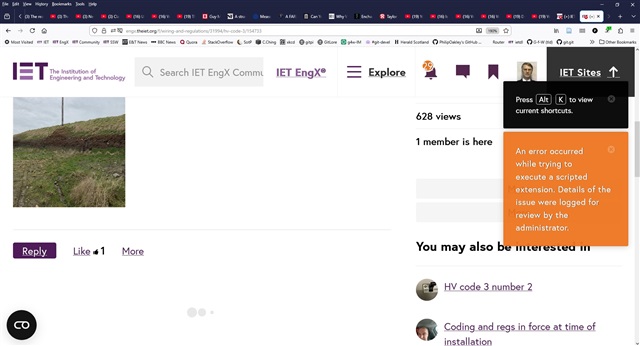
    I'm on Firefox browser. Here's the screenshot (Alt+PrtScrn) of the error. There is the extra black notice about the [Alt+K] viewing of the current shortcuts because I used the above  (Alt+PrtScrn) to capture the screen shot. That orange error display simply moves down the page a bit.

    I also deliberately scrolled down the page (i.e. mouse wheel scroll was still active) to show that the Reply option is available for me on Firefox.

    I could try the "Inspect Element" web page investigation but I'd be flying blind wrt debugging ...

    Hope that helps

  • FWIW I use firefox as well, always running on Linux Mint when at home, or typically win 10 or 11 elsewhere. I too see the orange error message.

    M.

  • Ahh apologies Phil I meant did you get that as an email notification and if so could you forward that to the community online mailbox for me. Flushed

    If anyone does still have a copy or copies of the replies by email notifications if you could forward them on to community-online@ietengx.org it would be really helpful. 

    It's intriguing how it's only that one specific thread that's having a problem and yet all others are displaying as expected!  Thinking

  • At least 3 threads now sadly. The one about colours has gone the same way. And Elisabeth's commentary thread about the problem seems to have vanished from view altogether.
    M.

  • Hi Mike

    Check out the threads in our Using EngX forum as that's where we've been moving any posts specifically relating to the issue to. Keeps the Wiring Regs forum on topic Blush  

  • Oh, a hidden discussion forum ! Oddly one not shown on the banner on the discussion origin page

    Apart from following the link your  post above, what is the correct way to find or link into it please ?

    (i normally come in via https://engx.theiet.org/f  coz I can remember that, I'm not sure how others get in,  the about page on the wider site does not link to either )
    Mike.

Reply
  • Oh, a hidden discussion forum ! Oddly one not shown on the banner on the discussion origin page

    Apart from following the link your  post above, what is the correct way to find or link into it please ?

    (i normally come in via https://engx.theiet.org/f  coz I can remember that, I'm not sure how others get in,  the about page on the wider site does not link to either )
    Mike.

Children
  • Hi Mike

    From the 'Explore' menu at the very top or if you're visiting on a mobile device, it's the three line 'burger' menu at the top. You'll see the 'Using EngX' option in the navigation options which will take you to that area of the EngX community where you'll also find our How to use EngX guidance documentation. Remember that the EngX community is larger than just the discussion forums Wink

  • Thanks for that. Useful to know there is another set of posts there. 

    Oddly I get both get 3 lines and the word Explore in the frame header, next to the words IET EngX. 

    Mike.

  • If you're viewing on a desktop or laptop Mike then yes you'll see both the three lines and Explore. For the mobile device view though, that reduces to just the three lines 'burger' style menu, unless of course your mobile device's personal preferences are set to display websites in a different resolution/format. 

  • Well, laptop and iPad look just the same here, but no "Explore" on the dog and bone.